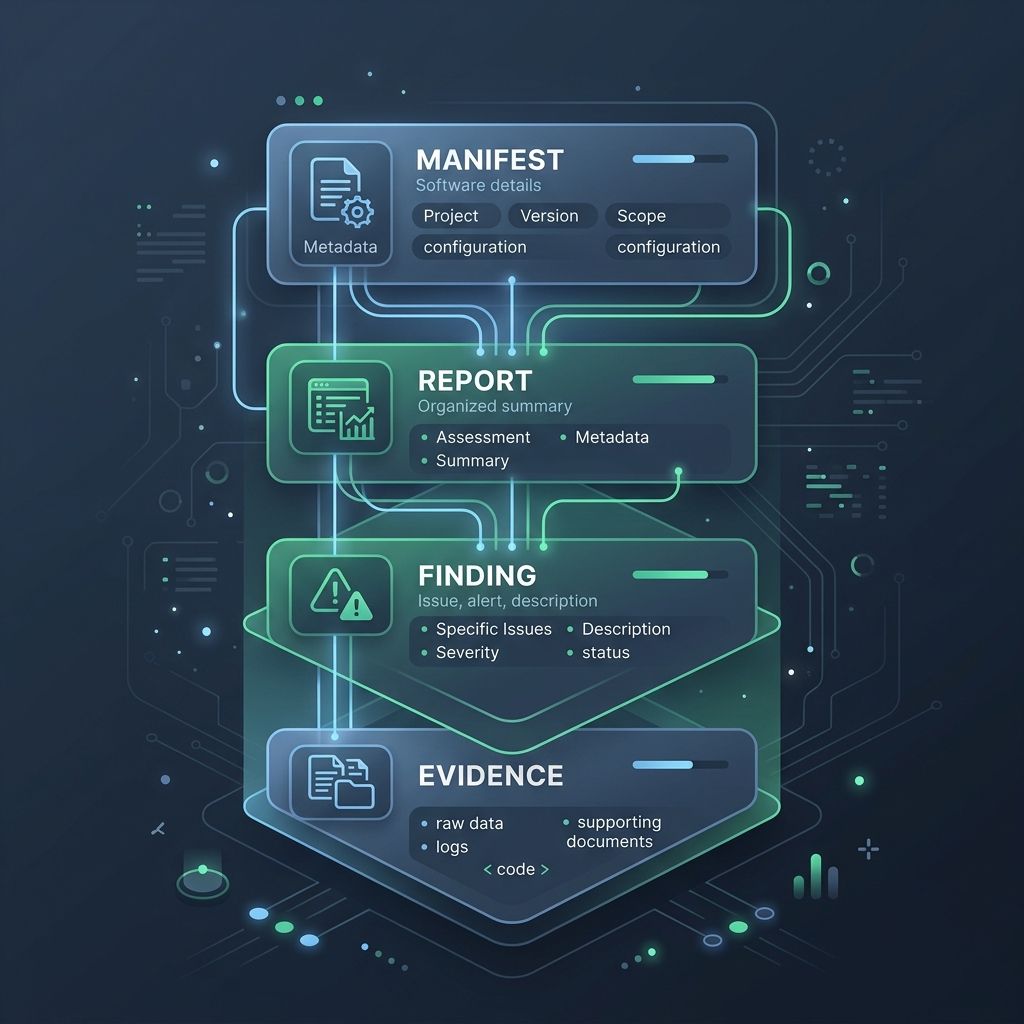
Have you ever frequently encountered terms like Manifest, Report, Finding, and Evidence while reading various API documentation, security scanner output, or CI/CD pipeline logs? They aren’t syntax from any specific programming language, but rather industry-standard data hierarchy terms. What do these terms actually mean?
Core Concept: Understanding Data Hierarchy Through a “Health Check”
We can visualize them as the workflow of getting a health checkup at a hospital. These four terms correspond precisely to data tiers from high-level summaries down to raw evidence.
| Term | Health Check Analogy | Software Architecture Explanation |
|---|---|---|
Manifest |
Checkup Registration Form | Declares execution scope, versions, and environment configs; descriptive metadata. |
Report |
Complete Health Check Report | Complete post-execution summary containing overall status and audit results. |
Finding |
Red Flag Notes in Report | Specific findings flagged in the report, such as “High Blood Pressure” or security flaws. |
Evidence |
BP Monitor Data Strip | Raw, objective evidence supporting findings, such as log files or measured metrics. |
These terms are not reserved keywords of a programming language, but industry-standard shared data models.
We can use a Mermaid diagram to illustrate the upstream/downstream and containment relationships among these four concepts:
  graph TD
    A["Manifest (Execution Spec/Metadata)"] -->|Defines Scope & Execution| B["Report (Complete Summary Report)"]
    B -->|Contains Multiple| C["Finding (Specific Finding/Observation)"]
    C -->|Associates Multiple| D["Evidence (Objective Raw Evidence)"]
Why Layer Architecture This Way? Three Major Advantages of Data Hierarchy
Why split data so granularly instead of stuffing everything into one massive JSON object? This architectural pattern offers several key advantages:
Great API architecture ensures smoother frontend rendering, higher data credibility, and better extensibility.
| Advantage | Explanation |
|---|---|
| Separation of Concerns | The frontend can load Finding summaries first for instant views, fetching heavy Evidence only when needed. |
| High Credibility | Providing raw Evidence proves that a Finding is not a false positive, boosting system auditability. |
| Flexible Extensibility | A single Finding can dynamically reference multiple Evidence items without breaking schemas. |
Additional Common Terms: Metadata, Artifact, and Payload
Beyond the four core tiers, designing API endpoints, building pipelines, or defining payload schemas often involves three more essential terms: Metadata, Artifact, and Payload:
| Term | Core Definition | Real-Life Analogy | Practical Software Architecture Example |
|---|---|---|---|
Metadata |
Data describing data itself | Shipping label on a box, EXIF camera info | HTTP Header, request timestamp, pagination page. |
Artifact |
Tangible outputs generated by a workflow | Factory-produced car, medical CD | Compiled .apk binary, Docker Image, audit PDF report. |
Payload |
Core business data being transmitted | Smartphone inside the shipping parcel | JSON business content inside HTTP POST Body. |
Payloadis like the item inside a shipping package, whileMetadatais the shipping label stuck on the outside.
To better understand how these three work together, consider this typical API Request data structure:
{
  "metadata": {
    "version": "v1.2.0",
    "timestamp": "2026-08-02T15:08:41Z",
    "request_id": "req-98765"
  },
  "payload": {
    "report_id": "REP-2026-001",
    "status": "COMPLETED",
    "artifact_url": "https://example.com/artifacts/build-report.pdf"
  }
}
In this JSON example:
metadataprovides transmission and environmental context (version, timestamp, request ID).payloadcontains the actual business domain data (report ID, execution status).artifact_urlpoints to the tangible file produced by the build task (Artifact).
The Power of a Shared Vocabulary: Bridging Cross-System Communication
When different tools and teams adopt this consistent data model (Report -> Findings -> Evidence), cross-team communication overhead drops dramatically.
Imagine a Report generated by your CI/CD pipeline being seamlessly ingested into security scanners for automated analysis—that’s the integration power of shared domain language.
  sequenceDiagram
    autonumber
    actor CI as CI/CD Pipeline
    participant Scanner as Security Scanner
    participant Dashboard as Management Dashboard

    CI->>Scanner: Provide Manifest to Run Scan
    Scanner->>Scanner: Generate Report & Findings
    Scanner->>Dashboard: Send Structured Payload (Finding + Evidence)
    Dashboard-->>CI: Display Audit Results
Summary
Ultimately, these terms exist to solve large-scale data communication and structuring challenges across distributed systems.
When integrating systems or designing API payloads, try incorporating these data hierarchy concepts to make your architecture cleaner, more professional, and highly extensible!