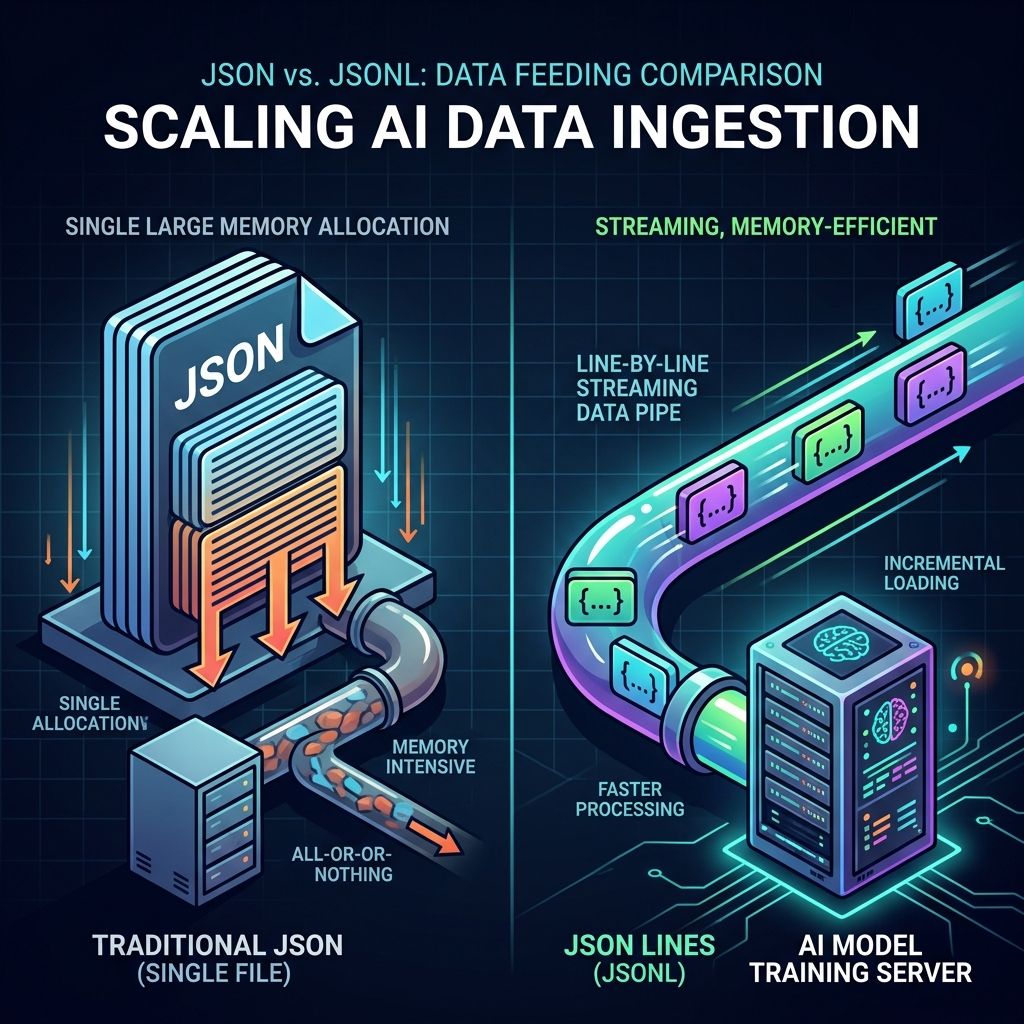
Everyone is familiar with JSON and CSV, but have you ever experienced your memory exploding when processing a multi-GB JSON file? Or found escaping characters extremely painful when recording deeply nested data in CSV?
In modern AI training and massive data processing, a data format is quietly becoming the mainstream standard: JSONL (JSON Lines).
The Core Value of JSONL: Solving the two major pain points of traditional JSON being unable to stream-read and CSV being unable to support nested structures!
What Is JSONL? Understand the Core Definition of “One JSON Per Line” in One Minute
The full name of JSONL is JSON Lines (sometimes also called NDJSON, standing for Newline Delimited JSON). Its core concept is very straightforward: each line is an independent and complete JSON object.
In traditional JSON files, the outermost level usually has a huge square bracket [] wrapping all data, and objects must be separated by commas ,. In contrast, JSONL completely eliminates outermost square brackets and commas, using the newline character \n to separate each record.
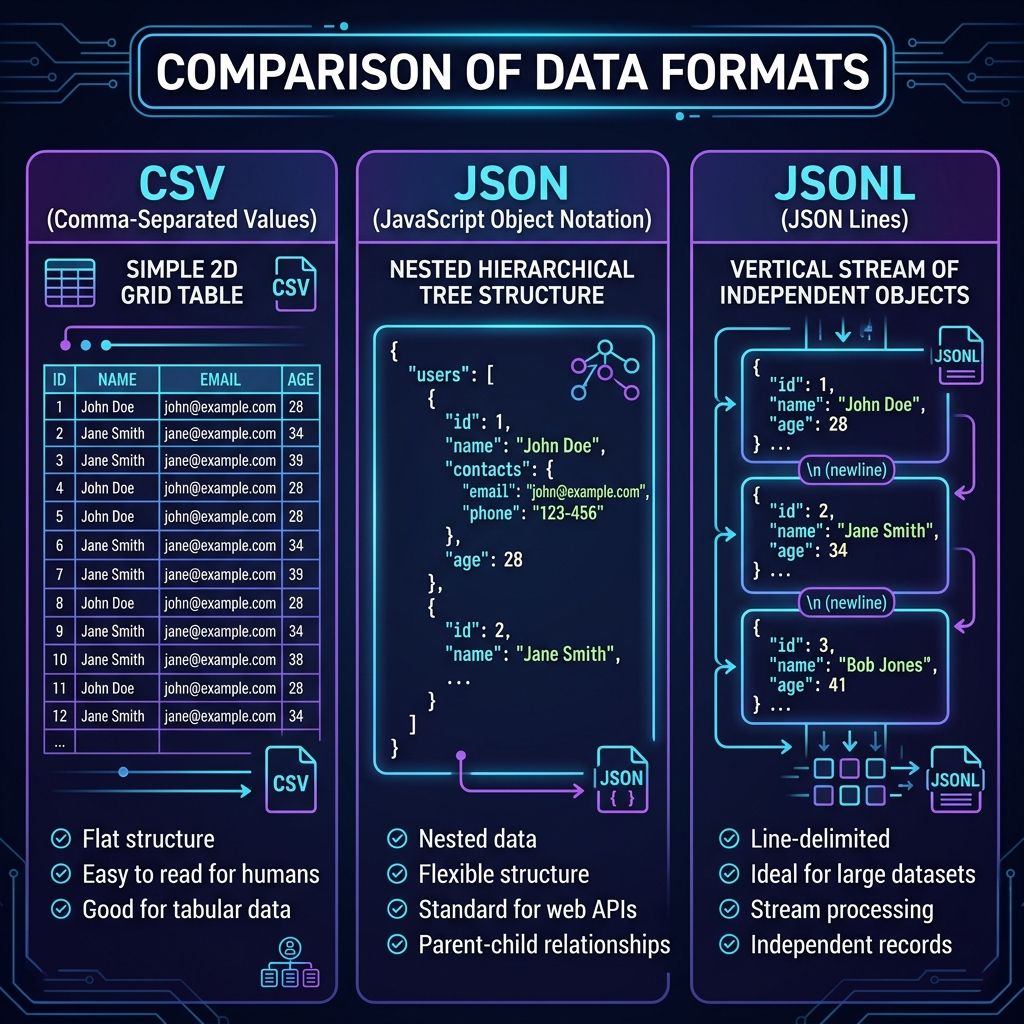
Comparison of Three Common Data Formats
To make it more intuitive, let’s compare JSONL, JSON, and CSV together:
| Data Format | Layout Structure | Nested Data Support | Streaming Read/Write | Best Use Case |
|---|---|---|---|---|
| JSON | Single-tree hierarchy, must load all at once | Native Support | Difficult (requires loading full file) | Web API transfer, configuration files |
| CSV | 2D flat table, columns separated by commas | Difficult (requires escaping/encoding) | Native Support | Excel reports, flat data |
| JSONL | One independent JSON per line, separated by newline | Native Support | Excellent (Line-by-line read & append) | AI training datasets, massive Log records |
Why Do AI Model Training and Big Data ETL Prefer JSONL?
In recent years, with the rise of Large Language Models (LLMs) such as OpenAI and Anthropic, JSONL has emerged as the preferred format for Fine-tuning and dataset preparation. There are two key advantages behind this:
1. Extremely Low Memory Footprint (Supports Streaming Processing)
When your training dataset reaches 50 GB, a traditional JSON file requires the program to read the entire 50 GB file into memory to parse the syntax tree, immediately triggering Out-Of-Memory (OOM) errors.
In contrast, JSONL supports Line-by-line Streaming. The program only needs to read one line at a time (often just a few KB), release memory after processing, and then read the next line.
  flowchart TD
    subgraph TraditionalJSON["Traditional JSON Reading Method"]
        A1["Read 50 GB JSON File"] --> A2["Parse Entire File Syntax Tree"]
        A2 --> A3["Load 50 GB into Memory at Once"]
        A3 -->|High Risk| A4["Out of Memory Crash (OOM)"]
    end

    subgraph JSONLStreaming["JSONL Streaming Reading Method"]
        B1["Open 50 GB JSONL File"] --> B2["Read Line 1 (5 KB)"]
        B2 --> B3["Parse & Process Single Record"]
        B3 --> B4["Release Memory & Read Next Line"]
        B4 --> B5["Process Massive Data Stably & Efficiently"]
    end
For massive data, JSONL reduces memory consumption from O(N) to O(1)!
2. Supports Lock-Free Appends (Append-Only Logging)
In distributed systems or log collection scenarios, if you want to add data to the end of a file:
- Traditional
JSON: Must read the entire file, remove the closing], add a comma,, write new data, and add back]. - JSONL: Directly append a string and newline
\nto the end of the file to complete the write.
3. Big Data Parallel Processing
Because every line in JSONL is an independent JSON object, large files can be split at any newline character into smaller chunks and sent to multiple CPU cores or computing nodes for parallel processing without interfering with each other.
5 Strict Formatting Rules Every Developer Must Know About JSONL
Although JSONL is extremely flexible, official specifications (jsonlines.org) define 5 strict formatting rules to ensure parsers can process files smoothly:
Detailed Specification Description
| Rule No. | Strict Rule Item | Description & Correct Demonstration |
|---|---|---|
| Rule 1 | Every Line Must Be Valid JSON | Each line evaluated independently must be parsable by standard JSON.parse(). |
| Rule 2 | Unescaped Newlines Are Forbidden | If a string contains newlines, they must be escaped as \n. Multi-line formatting is forbidden. |
| Rule 3 | Outer Bracket Symbols Are Forbidden | Outermost square brackets [] are strictly forbidden, and no commas , between lines. |
| Rule 4 | UTF-8 Encoding Without BOM | Must strictly use UTF-8 encoding and must not contain a BOM header. |
| Rule 5 | No Empty Lines by Default | Every line must contain valid data; only the very last line of the file allows a trailing blank line. |
Practical Parsing: How to Write High-Defensive JSONL Reading Code?
In real-world development, because JSONL is Schema-less, Keys across lines may differ completely. When writing parsing logic, following defensive principles is highly recommended:
Defensive Code Example (Python)
import json

def process_jsonl_file(file_path):
    with open(file_path, "r", encoding="utf-8") as f:
        for line_num, line in enumerate(f, 1):
            # 1. Automatically skip empty lines (prevent parsing failures)
            line = line.strip()
            if not line:
                continue

            try:
                data = json.loads(line)

                # 2. Defensive value retrieval: use .get() to avoid KeyError
                user_id = data.get("id")
                user_name = data.get("name", "Unknown")

                # 3. Field type identification (polymorphic data processing)
                doc_type = data.get("type", "default")

                print(f"Line {line_num}: [{doc_type}] {user_id} - {user_name}")

            except json.JSONDecodeError as e:
                print(f"Error parsing line {line_num}: {e}")

# Execute reading
process_jsonl_file("dataset.jsonl")
Key Defensive Tip: Use
strip()to clear leading/trailing whitespaces and.get()instead of direct key access to prevent over 90% of runtime crashes!
Scenario Selection Guide for JSONL, JSON, and CSV
After learning about JSONL’s powerful features, should all data be converted to JSONL? The answer is: it depends on your use case!
| Scenario Need | Recommended Format | Reason Description |
|---|---|---|
| Web Frontend/Backend API Transfer | JSON | High native browser support, moderate single-transfer data size. |
| Export Data for Non-Technical Users / Marketing | CSV | Can be opened and viewed directly with Excel. |
| AI Model Fine-tuning | JSONL | Official training format specified by OpenAI / Anthropic APIs. |
| System Massive Log Recording | JSONL | Low write cost, supports infinite append and ultra-low memory usage. |
| Big Data ETL Pipelines | JSONL | Convenient for distributed splitting and parallel processing. |
As long as you master the characteristics of each format and choose the right tool for the right scenario, your data processing performance will be greatly improved!