Introduction
When diving into the Node.js ecosystem, you might immediately feel a sense of “Warring States” chaos: npm, yarn, pnpm, and the recently trending bun… What’s going on? Why are there so many package managers?
It’s like you’ve opened a chain fast-food restaurant. Developing a project is like researching new dishes, while a package manager is your procurement and logistics system. Early Node.js developed too quickly, and the veteran npm, while capable of carrying goods, was slow, had a messy warehouse (node_modules), and often bloated your storage.
To help everyone clarify this “logistics war,” I’ve put together this decision guide to help you find the most suitable “logistics provider.”
The Four Logistics Giants: Which One is Your Best Express?
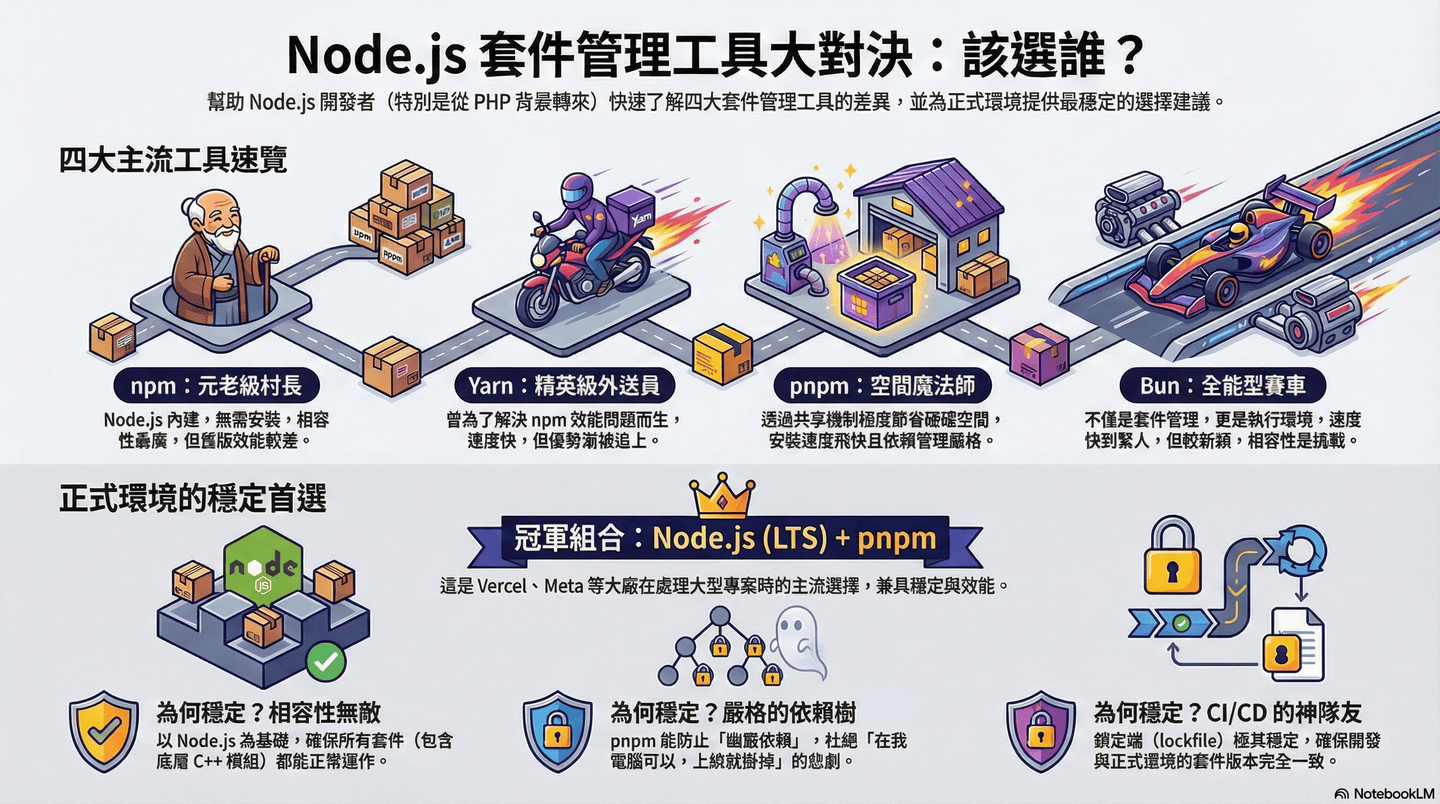
Let’s jump straight into the big table showdown so you can see the personalities of these four contenders at a glance:
| Tool | Persona & Personality | Special Move (Pros) | Weak Point (Cons) |
|---|---|---|---|
| npm | The Veteran Village Chief. Every household has it. | Built into Node.js, no installation required. | Older versions are slow; warehouse structure is like a maze. |
| Yarn | The Elite Delivery Driver. Born because npm was too slow. | Fast, parallel downloads, strict yarn.lock. |
Advantage gradually caught up; status slightly awkward. |
| pnpm | The Space Magician. Hard drive savior! | Saves massive disk space, extremely fast. | Symlink architecture; a few old packages might fail. |
| Bun | The Courier in a Tesla. An all-around athlete. | Unbelievably fast, native TS support. | Newcomer; still has compatibility challenges in production. |
pnpm’s Space Black Magic: Saving Your Hard Drive Space
This is definitely the biggest pain point for Node.js developers: the bottomless pit of the node_modules black hole. In the traditional npm world, if you have 10 projects using lodash, your hard drive stores 10 physical copies of those files.
pnpm (Performant npm) solves this problem directly using the “Global Store” concept:
- Traditional (npm/Yarn v1): Physical Duplication. Every room is stuffed with a set of the
same furniture, wasting space repeatedly. - pnpm: Magic Portal (Hard Link). Furniture is all stored in a
central warehouse, and your room only has a “portal” leading to the warehouse.
This means that no matter how many hundreds of projects use the same version of React, it physically occupies only one spot of space on your computer. Plus, installation is lightning fast because it already “remembers” most parts from other projects!
Will the Shared Warehouse Interfere with Each Other?
Old drivers will surely ask: If I modify a package in project A’s node_modules, won’t project B break too? Don’t worry, pnpm has a Read-only mechanism—files in the global store cannot be easily modified. If you truly need to customize a package, pnpm has the pnpm patch mechanism to handle it safely.
Bun’s Speed Legend: Not Just Package Management, but a Runtime
If pnpm is a warehouse organizing expert, then Bun is a racing car running at full speed.
Bun’s speed comes from its “start from scratch” approach:
- Upgraded Engine: It doesn’t use Chrome’s V8; instead, it uses Safari’s JavaScriptCore.
- Written in Low-level Language (Zig): There’s almost no wasted action when handling file I/O and network transfers.
- All-in-one Toolkit: Bun comes built-in with
bun install,bun run(runtime),bun test(test framework), andbun build(bundler).
For developers seeking “Vibe Coding” responsiveness, Bun can shorten the time from saving a file to seeing results to “the blink of an eye,” without interrupting your development flow.
Real-world Choice: Which One for Production?
If you’re running a service with “actual heavy traffic” and want 99.9% stability and maximum compatibility, an old driver’s personal recommendation is:
Node.js (LTS Version) + pnpm
This is currently the mainstream combination used by industry giants (like Vercel, Meta) when handling Next.js projects.
| Reason | Explanation |
|---|---|
| Undefeated Compatibility | Next.js is by Vercel, and Vercel’s infrastructure is based on Node.js benchmarks. |
| Strict Dependency Tree | pnpm doesn’t allow “phantom dependencies” (packages used but not declared in package.json), ensuring the “it works on my machine but crashes on the server” tragedy doesn’t happen. |
| Best Buddy for CI/CD | pnpm’s pnpm-lock.yaml is very stable, ensuring the parts installed in production are identical to those during development. |
Conclusion
| Goal | Recommended Tool |
|---|---|
| General new projects or pursuing disk efficiency | pnpm |
| Speed experience during development and experimental projects | Bun |
| Maintaining extremely old projects | npm or Yarn v1 |