Foreword
Have you ever encountered this situation: You want AI to help you handle a specific task in your project, but after stuffing all the background knowledge, coding standards, and API documentation into the Prompt, you find that the AI’s Context Window explodes, or the AI starts rambling due to information overload?
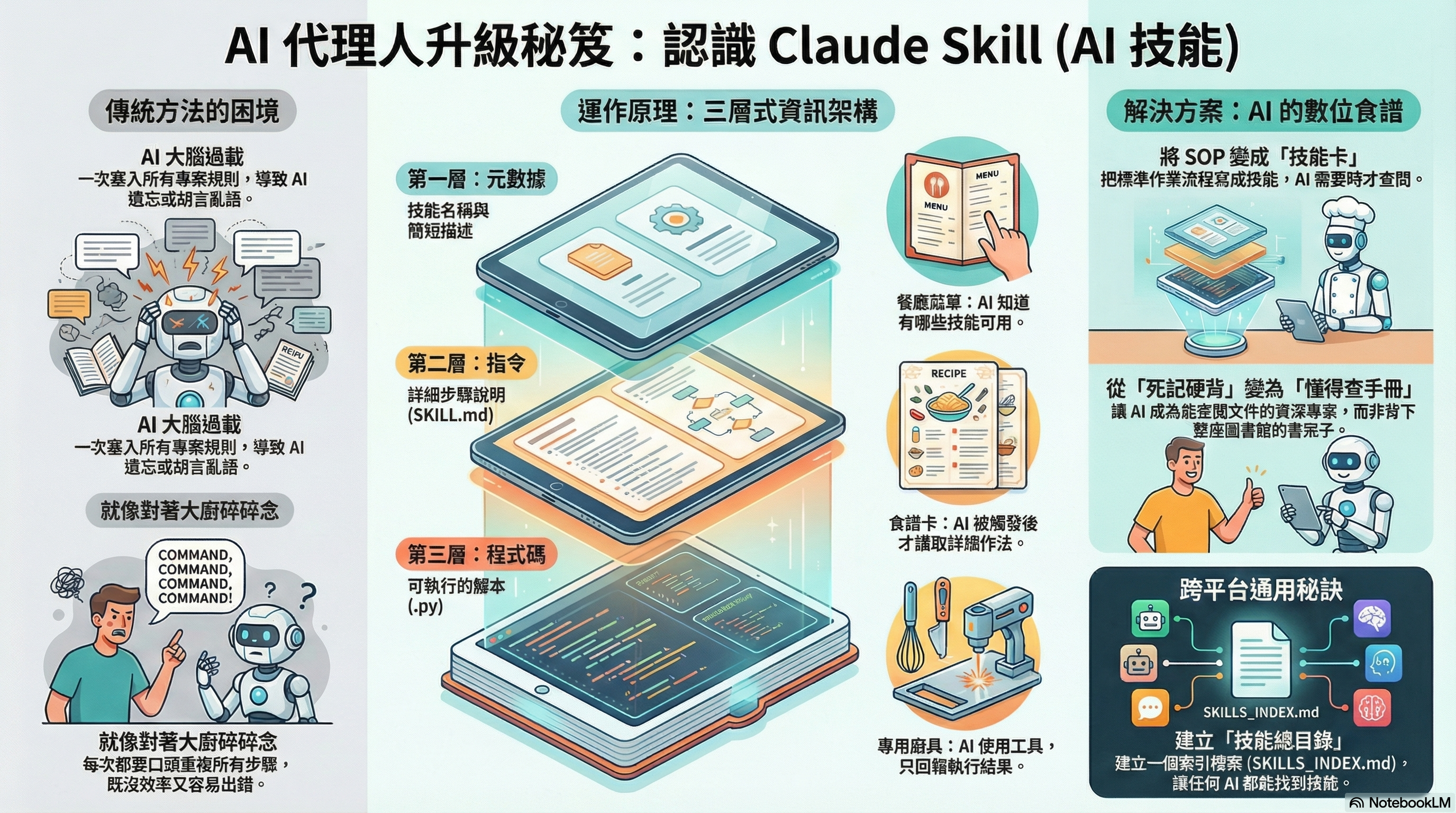
It’s like hiring a Michelin star chef, but every time you have to stand next to him and nag: “Hey, chop the onions now, then scramble the eggs, remember to add salt…” Although the chef is skilled, repeating this every time is exhausting for you, and the chef might miss something.
To solve this problem, Claude (Anthropic) introduced a powerful concept—Claude Skill (Agent Skill). This article will take you deep into what this “black technology” is and how to integrate it into your projects, turning every AI Agent into a senior combat-ready asset for you.
What is Claude Skill? (A Daily Analogy: Secret Recipes in the Kitchen)
If we want to explain Claude Skill in the simplest way, we can imagine it as “Recipe Cards placed on the shelf of a high-end restaurant kitchen”.
- General Prompting: Like you standing next to the chef (AI) giving verbal instructions.
- Claude Skills (Agent Skills): Like writing down your Standard Operating Procedures (SOP) into recipe cards.
These cards are usually stored in folders (the file system), and the chef doesn’t need to memorize the entire encyclopedia (saving Context Window). Only when you shout “Make a Beef Wellington”, the chef goes to the shelf, pulls out that specific recipe card, and follows the steps one by one.
Core Structure of a Skill
The structure of a Skill is actually very simple. It’s just a folder, typically containing three parts:
SKILL.md: This is the recipe itself. It says: “If you want to process a PDF, do this first, then that…”.scripts/(Optional): Like a specialized peeler in the kitchen. These are specific Python or Bash scripts for the AI to execute directly, without having to make up code itself.- Metadata (YAML): The label on the spine of the recipe book (name, description), allowing the AI to quickly scan and know what this recipe is for.
Why Does This Make Agents Smarter? (Architectural Advantage)
This utilizes a psychological/technical concept called “Progressive Disclosure”.
- Before using Skills: You stuff all project rules, coding standards, and API docs into the AI. The AI’s brain capacity (Context Window) instantly explodes.
- After using Skills: The AI starts knowing only “I have a list of these tools (Metadata)”. When encountering a specific task, it then “reads” that specific
SKILL.mdinto its brain.
This makes your AI Agent like a “Senior Engineer who knows how to consult manuals”, rather than a “Nerd trying to memorize the entire library”.
Deep Dive: Skill Mechanics and Format
Claude Skill’s operating logic divides information into three levels, allowing the AI to “take only what is needed, when it is needed”:
| Level | Content | When Loaded | Token Cost | Daily Analogy |
|---|---|---|---|---|
| Level 1 | Metadata YAML tags: Name, Description |
Always Put into System Prompt at startup |
Very low (~100 tokens) | Restaurant Menu You look at the menu and know the dish exists, but don’t need to enter the kitchen yet. |
| Level 2 | Instructions Teaching within SKILL.md |
Triggered AI uses Bash to read the file when it feels necessary |
Medium (<5k tokens) | Recipe Card Confirmed to cook this dish, then take out this card to check steps. |
| Level 3 | Resources & Code Scripts ( .py) or references |
As needed Execute script or consult specific docs |
Almost zero Only returns execution results |
Specialized Tools Take out the mixer to beat eggs; you only need the result, not to swallow the whole machine. |
SKILL.md Format Example
A standard Skill file consists of a YAML header and Markdown content:
---
name: data-analyzer           # Rule: lowercase, numbers, hyphens
description: Analyze data from CSV files and generate charts. Use when the user asks for insights from spreadsheets. # Rule: Clearly describe "what to do" and "when to use"
---

# Data Analyzer Skill

## Instructions
1.  First, check the CSV file path provided by the user.
2.  Use `scripts/analyze.py` script to read data.
3.  If analysis is successful, please summarize data trends in Traditional Chinese.

## Examples
User: "Analyze this sales report"
Assistant: (executes python scripts/analyze.py sales.csv)
How to Build a “Cross-Model” Universal Architecture?
A pain point for many is: “I don’t want to be locked into Claude! What about other AIs (like Gemini, Cursor, VS Code Copilot)?”
Claude Code can automatically scan because its runtime has hardcoded logic to traverse .claude/skills. Other Agents are like readers walking into a library without a catalog system.
To solve this, we can build a “Master Index”.
Solution 1: Create SKILLS_INDEX.md
Create a SKILLS_INDEX.md or AGENTS_README.md in the project root, with the following structure:
# AI Agent Skills Index
(Note: This project contains modular Agent Skills. When you encounter the following tasks, please read the corresponding SKILL.md file for operational standards.)

## Available Skills

| Skill Name | Path | Description & When to use |
| :--- | :--- | :--- |
| PDF Processing | `skills/pdf-processing/SKILL.md` | Use when user asks to "Read PDF", "Extract Table", or "Merge Files". |
| Code Review | `skills/code-review/SKILL.md` | Use when user asks to "Review Code", "Check PR", or "Optimize Code". |

## How to use
1. Read the list above first.
2. Based on the user's Prompt, judge which Skill is most relevant.
3. Proactively Read the `SKILL.md` content under that path into Context.
This is like the “Menu” at the restaurant entrance. As soon as Gemini or Cursor enters the project and reads this file, it knows “Oh! So I have these moves available”.
Solution 2: Specialized Solution for Cursor (.cursorrules)
If you are using Cursor, it has a powerful feature called .cursorrules. You can write the indexing logic directly into it, letting Cursor automatically mount Skills.
You are an advanced AI coding assistant. This project utilizes a standardized "Agent Skills" architecture located in the `skills/` directory.

Before executing complex tasks, verify if a relevant skill exists:

[Skill List]
- name: pdf-processing
- path: skills/pdf-processing/SKILL.md
- description: Extract text and tables from PDF files.

Instruction:
If the user's request matches a skill's description, you MUST read the content of the corresponding `SKILL.md` file before proceeding.
Solution 3: Automated Generation Script
To avoid the hassle of manually maintaining the index, you can write a simple update_skills_index.py script to automatically scan the YAML headers of all SKILL.md files and generate SKILLS_INDEX.md.
How to Quickly Create a Skill?
Don’t want to write YAML and Markdown by hand? You can use “AI Skill” to generate “AI Skill”!
Anthropic officially provides a skill-creator Skill, which is essentially an “Interview-style Wizard”.
- Install: Put the
skill-creatorfolder into your skills directory. - Summon: Say to the AI, “Hey, I want to create a new Skill, please help me using skill-creator.”
- Interact: It will start asking you: “What tool do you want to make?”, “Do you need to write Python scripts?”.
- Generate: After the conversation, it will automatically spit out standard format
SKILL.mdand folder structure for you.
This is like you don’t have to draw the blueprint yourself, but ask a “Blueprint Generator Robot” to draw it for you.
Conclusion
Claude Skills (Agent Skills) are not just a feature exclusive to Claude; they are an open Agent collaboration standard. Through standardized file structures and clear indexing mechanisms, we can let this powerful architecture cross model boundaries and apply it in any AI development environment.
With this “Digital Employee Operation Manual”, your Agent is no longer a rookie who only knows how to ramble, but a senior expert who can consult SOPs and execute tasks precisely at any time. Start building your Skill Standard Library now!
Reference
Tutorials
Skills
- skills/skills/skill-creator/SKILL.md at main · anthropics/skills · GitHub
- Agent Skills Marketplace - Claude, Codex & ChatGPT Skills | SkillsMP
- Claude Skills Hub - Discover and Download Skills
- GitHub - ComposioHQ/awesome-claude-skills: A curated list of awesome Claude Skills, resources, and tools for customizing Claude AI workflows