
Photo by Mohammad Rahmani on Unsplash
Starting from version 84, Chrome defaults the SameSite attribute of Cookies to Lax. Services using Third-party cookies may be affected if they haven’t set SameSite properly.
Overview
Cookies are mechanisms used in web services to store state, commonly used for maintaining login sessions, shopping carts, ad tracking, etc. However, the widespread use of Cookies also brings privacy and security concerns, and SameSite was introduced to address these issues.
First-Party and Third-Party
Based on the source of the Cookie (Set-Cookie), each Cookie has a specific Domain. When looking at the current URL in the user’s browser, if the Cookie’s Domain matches the current URL, it is First-Party; otherwise, it is Third-Party.
Third-party
For example, when browsing a.com, a request is sent to third-party.com and receives a Cookie from third-party.com. Since the browser automatically includes Cookies with the same Domain in requests, if you later browse another site like b.com and it also sends a request to third-party.com, the server will receive the Cookie. For these two sites, the third-party.com Cookie is Third-party.
First-party
If you browse a website that matches the third-party.com Domain, the Cookie will also be sent. In this case, the Cookie is called First-party.
Same-Origin and Same-Site
The previous example mentioned using the Domain to determine the type of Cookie, but a better way to put it is determining whether the Site is the same. Does this relate to the frequently seen Same-origin?
Origin
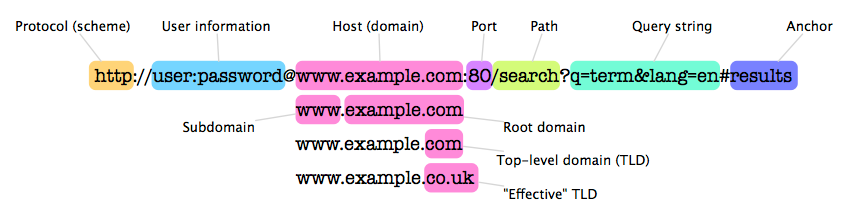
Origin is composed of Scheme, Host, and Port. The determination method is very simple: if the Scheme, Host, and Port of two URLs are all identical, they are Same-origin; otherwise, they are Cross-origin.
Site
Same-Site determination involves Effective top-level domains (eTLDs). All eTLDs are defined in the Public Suffix List, and a Site is composed of an eTLD plus a prefix.
For example:
github.io exists in the Public Suffix List. Adding a prefix (e.g., a.github.io) makes it a Site. Therefore, a.github.io and b.github.io are two different Sites (Cross-site).
example.com does not exist in the Public Suffix List, but .com does, so example.com is a Site, and a.example.com and b.example.com are the same Site (Same-site).
Note that Site does not include Port, so even if Ports are different, they can still be Same-site.
Why SameSite?
The mechanism where “any Request carries cookies for that Domain” also brought security and other issues, the most important being Cross-site request forgery (CSRF).
CSRF
Suppose a user has logged into example.com and obtained a Cookie. When the user browses a malicious site evil.com, JavaScript in that site can send a POST Request to example.com/pay?amount=1000. The browser will automatically include the example.com Cookie, and the user unknowingly pays 1000 dollars. The Server cannot determine where this Request came from.
Limitations
Cookies themselves cannot be set to be sent only in a First-party environment, so Requests carry Cookies in any environment. The Server cannot identify the source of the Request and can only respond as usual, causing the Client to waste bandwidth sending useless Cookies.
Solution
With the SameSite attribute, we can individually configure the conditions for sending Cookies in different environments.
SameSite
The SameSite attribute has three values. Setting it to Strict or Lax can restrict Cookies to be sent only in Same-Site Requests. If left blank, the behavior depends on the browser; for Chrome, the default is Lax.
Strict
Cookies are sent only in a First-party environment. However, there is a problem: suppose a user sees a Facebook post link on example.com (let’s say fb.com). Even if the user has logged into fb.com and obtained a Cookie, clicking the link will not send the Cookie because the two sites are Cross-site, so they will only see the login page.
Therefore, Strict is suitable for sensitive actions, such as deleting posts, making payments, etc.
Lax
To address the overly strict limitations of Strict, Lax allows sending Cookies even in Cross-site situations in the following cases:
- Typing a URL in the address bar
- Clicking a link
<a href="..."> - Submitting a form
<form method="GET"> - Prerendering
<link rel="prerender" href="...">
These cases have two common points: they are all GET requests and they all trigger Top-level Navigation. This avoids the issue where Strict requires logging in again every time, and also prevents unknowingly sending Cookies when browsing other websites.
Lax + POST
However, to avoid breaking some existing login flows, Chrome currently relaxes the restriction slightly for SameSite=Lax, giving developers more time to adapt.
Within two minutes of the Cookie being set, regardless of the Request Method, as long as it triggers a Top-level page navigation, the Cookie will be sent. This means if the browser changes pages, for example submitting a form <form method="POST">.
For details, please see the thread about Lax + POST.
None
To send a Third-party cookie, you must set SameSite=None; Secure. Yes, from now on, if you want to send a Third-party cookie in a testing environment, please prepare https://localhost.
Additionally, sending Cross-Origin Requests via XHR/Fetch requires setting withCredentials: true to send the Cookie and make the Set-Cookie in the Response header effective. The Server must also set Access-Control-Allow-Credentials: true in the Response header for JavaScript to access the Response content.
Unsupported Browsers
Not all browsers support the latest SameSite rules yet, so some temporary Workarounds can be added on the Server to support multiple browsers:
Set Both Cookies
This method can solve problems for almost all browsers, but the downside is that there will be two copies of the Cookie:
Set-cookie: name=value; SameSite=None; Secure
Set-cookie: name-legacy=value; Secure
Server-side code:
if (req.cookies['name']) {
  // Use the new one if available
  cookieVal = req.cookies['name'];
} else if (req.cookies['name-legacy']) {
  // Otherwise use the old one
  cookieVal = req.cookies['name-legacy'];
}
User Agent
Determine the browser using the Request’s User agent to decide the content of Set-Cookie. This method only requires modifying the code that sets the Cookie, without changing the Parsing part. However, this judgment method involves more variables and makes it easier to set the wrong Cookie.
Review
- Cookies without the SameSite attribute set will default to
SameSite=Laxandcannot be sentin a Cross-site environment. - To send Cookies in Cross-site, you need to set
SameSite=None; Secure. - You can use the SameSite sandbox to test if your current browser complies with the latest SameSite rules.